Defender for Endpoint - What is it? And how do I onboard Windows Devices?
Defender for Endpoint: The Deployment Mistakes I Keep Fixing at Clients
Last year I opened a support ticket because Intune's Defender for Endpoint blade was completely greyed out. The support engineer's response was a URL. Just a URL. No explanation. Turns out I'd missed a toggle in a completely different portal. I've been doing Microsoft consulting for years and I still fell for it.
That's the kind of stuff this post is about. I've deployed MDE at enough enterprise clients now that I keep a mental checklist of "things that will go wrong," and it's the same list every time. This isn't a walkthrough. Microsoft's docs have one of those. This is the stuff the docs leave out.

"Why is the Intune blade greyed out?"
This one gets everyone. You buy MDE licenses, you're all excited, you go to Intune > Endpoint Security > Microsoft Defender for Endpoint, and... everything's greyed out. The toggles don't work. The status says the connection isn't established.

You start wondering if your licensing is wrong.

Your licensing is probably fine. There's a toggle in a completely different portal that you have to flip first.
I learned this the hard way at my second MDE deployment. Spent half a day convinced the tenant was broken. Opened a support ticket. The engineer responded with a link. Just a link. No explanation, no "hey sorry this isn't obvious," just a URL to the Advanced Features page in the Security portal. I clicked it, found the "Microsoft Intune connection" toggle, turned it on, and everything lit up in Intune 😥

The path: security.microsoft.com > Settings > Endpoints > Advanced features > "Microsoft Intune connection" > On > Save. One-time thing. Takes ten seconds. Could've saved me a support ticket and a lot of embarrassment.
After that, Intune lights up green and you can actually start creating EDR policies 😀
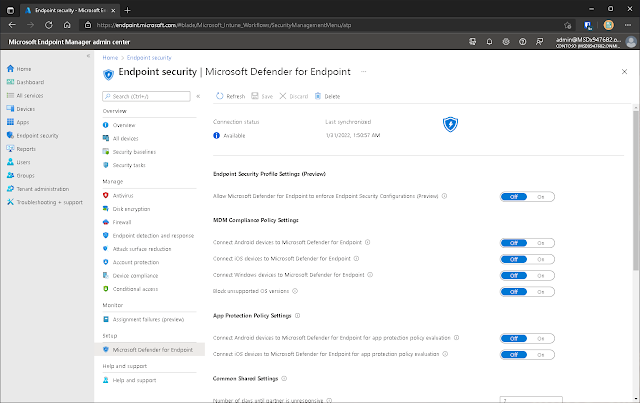
I've now seen this exact confusion at four separate clients. Four. Nobody reads the Advanced Features page during initial setup because why would you? You're in Intune. The Intune blade says "Defender for Endpoint." You expect it to just work. It doesn't. Not until you go flip that switch.
The P1 vs P2 Licensing Thing
Quick detour because this trips people up more than it should.
Defender for Endpoint got split into two plans back in 2021. P1 is the anti-malware baseline (cloud protection, attack surface reduction, device-based conditional access). P2 is the full EDR suite: behavioral detection, automated investigation, the zero-day stuff.

The problem is that when a client hears "Defender for Endpoint" they assume they're getting EDR. Then they buy P1 because it's cheaper, onboard everything, and three months later somebody asks "where's the threat analytics dashboard?" and the answer is "you don't have one, you bought P1."
I've had this conversation more times than I'd like. The comparison page is genuinely useful if you make people read it before they buy. P1 is fine for organizations that just need modern antimalware with cloud smarts. P2 is what you actually want if you're building a SOC or doing any kind of incident response. There is no upgrade path that doesn't involve buying new licenses, so get this right upfront or you'll be having an awkward conversation with procurement later.

At least they're trying!
Ghost Machines (or: "Why Are Only 200 of Our 400 Devices Reporting?")
So you've onboarded everything. Intune policy is assigned, GPO is linked, you sit back and wait. Two days later you check Security Center and half your fleet is missing.
Nine times out of ten, the missing devices are on-prem machines that are "domain-joined" in the loosest possible sense. They're in AD, sure. They're in the OU you targeted with your GPO, sure. But they haven't actually pulled a Group Policy refresh since... let me check... 2019.
This happens at every hybrid client. There's always a pocket of forgotten machines: COVID-era laptops that never reconnected to the office network, lab servers nobody reboots, whatever that finance department brought over from the 2018 acquisition. They're in the OU, they're in scope for your GPO, and the onboarding script never reaches them because they haven't talked to a domain controller in years. No error, no failure notification. Just silence.

For the GPO machines that are talking to your DC, here's what the setup looks like. You're pushing the onboarding script as a scheduled immediate task via GPMC, and the part where everyone trips up is the security context:


If you forget to set the task to run as SYSTEM with highest privileges, it runs as whatever user is logged in (or doesn't run at all if nobody's logged in). Ask me how I know.


And the ghost machines? That's where the local script comes in.
The Local Script Isn't Dead (Microsoft Just Wants It to Be)
Microsoft's official position on the local onboarding script is "testing only." They've been slowly walking this back from "up to 10 devices" to "evaluation purposes" to now basically saying don't use it in production.
I get why. The local script sets a higher telemetry reporting frequency, so every device you onboard this way phones home more often than an Intune or GPO device would. At scale that's wasteful.
But here's the reality: at every hybrid client, there's always a handful of machines that don't fit neatly into either Intune or GPO. The laptop that's domain-joined but hasn't been on the VPN in months. The conference room PC somebody set up manually. That one server running a line-of-business app from 2014 that nobody wants to touch.
For those, I RDP in and run the local script. Takes two minutes. The device shows up in Security Center, you can see it reporting, you move on with your life.


One rabbit hole I fell down: the onboarding script internally references a variable called TelemetryCriticalOptions. I'm pretty sure that's defining which telemetry tier the device uses, not just a parameter name. Which means the other tiers probably exist as undocumented options in there somewhere, and you could theoretically swap it out to get the normal reporting frequency on a locally-onboarded device. I'd bet dollars-to-doughnuts that's how it works.
I haven't actually tried it. But if you're reading this and you're stuck managing a brownfield mess where neither Intune nor GPO is realistic for some chunk of your estate, maybe poke at that script and let me know what you find 😉

The "Sample Sharing" Argument That Stalls Every Deployment
This one isn't technical. It's political.
When you set up the Intune EDR policy, there's a config option called "Block sample sharing for all files." It controls whether Defender can upload suspicious files to Microsoft for analysis.

Most of my clients leave it off (meaning sharing is allowed), because that's how you get the best protection. But I've had a deployment stall for two weeks because legal wanted to review the "data sharing implications." Healthcare client. Their concern was that Defender might upload a file containing patient data to Microsoft's cloud for analysis.
It's a legitimate concern, honestly. My advice: have this conversation before you're in the middle of deploying. Get legal and compliance in a room, show them the docs on what gets shared, get sign-off, move on. Don't let it become a week-two surprise.
How I Actually Validate That Things Work
Once devices start showing up in Security Center, I run Microsoft's test command to make sure telemetry is actually flowing and not just... there. This simulates suspicious behavior (downloading and running a fake invoice.exe from localhost) and should trigger an alert within 10-15 minutes:
powershell.exe -NoExit -ExecutionPolicy Bypass -WindowStyle Hidden $ErrorActionPreference = 'silentlycontinue';
(New-Object System.Net.WebClient).DownloadFile('http://127.0.0.1/1.exe', 'C:\test-MDATP-test\invoice.exe');
Start-Process 'C:\test-MDATP-test\invoice.exe'
If the alert shows up, you're good. If it doesn't after 20 minutes, check the MDE sensor service on the device. It's probably not running, or it started and crashed because of an AV conflict with whatever the client was running before MDE.


OK But How Do I Actually Onboard
I know, I know. Some of you Googled "onboard Defender for Endpoint" and I've spent the whole post complaining instead of showing steps. Fair enough. But if you're reading my substitute Lorem ipsum introductory block text, you probably already know how to do most of this 😉
Intune: Create an EDR policy at Endpoint security > Endpoint detection and response > Create Policy. Platform is Windows 10 and Later. Assign it to your device groups. Done.

(But flip that connector toggle first. I beg you.)

GPO: Download the Group Policy onboarding package from the Security portal (same Onboarding page, just pick "Group Policy" from the dropdown), unzip to a shared folder, create an Immediate Task in GPMC that runs the .cmd as SYSTEM with highest privileges. Link GPO to your OU. Make sure the UNC path uses the FQDN of your file server.

The unzipped package looks like this:

In my homelab I just threw it in a shared folder on the DC itself:
Don't do that in production. Use a proper DFS share. But for testing? Works fine.
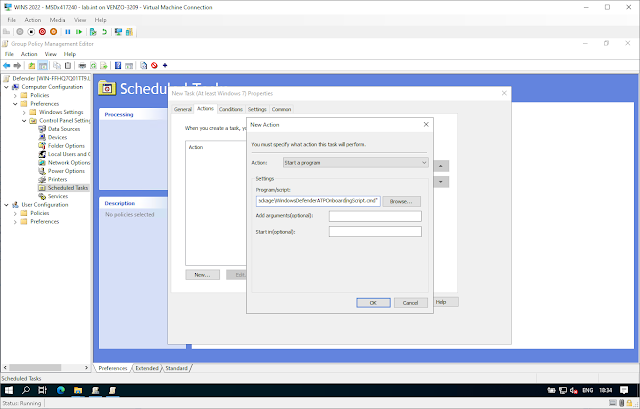
Local script: Download from Security portal > Settings > Endpoints > Onboarding > Local Script. Run elevated. That's it. Device shows up in Security Center within a few minutes 🙂

All three methods land in the same Security Center portal. Your SOC team won't know or care how a given device got onboarded. They just see devices reporting.
And if you're doing this at a real company (you probably are), you'll use Intune for the cloud-managed fleet, GPO for whatever on-prem machines still talk to a DC, and the local script for the strays. That's not a failure to pick one method. That's just what hybrid environments look like.

